Modern Tech Company Website & Workspace Architecture
আজকের একটি modern technology company-এর website শুধু একটি landing page নয়। বাইরে থেকে একজন visitor হয়তো শুধু homepage, products, pricing, documentation কিংবা company information দেখতে পায়। কিন্তু সেই polished website-এর পেছনে সাধারণত আরও বড় একটি digital architecture কাজ করে।
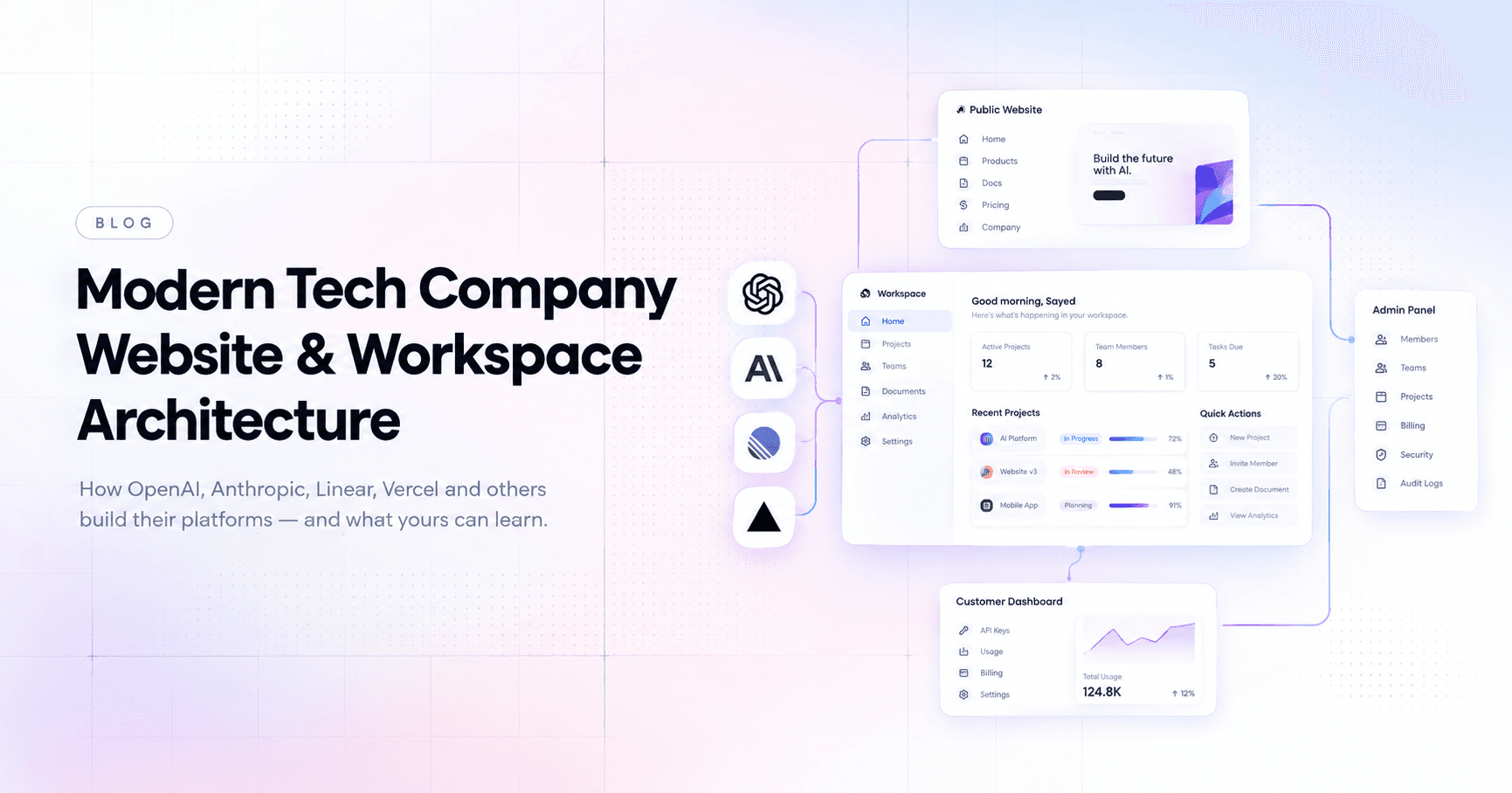
একদিকে থাকে Public Website—যেখানে customer, developer, investor, journalist বা সাধারণ visitor কোম্পানিকে জানতে পারে। অন্যদিকে থাকে Application / Customer Dashboard, যেখানে customer নিজের account, projects, API keys, billing, usage বা deployments পরিচালনা করে। আর সবশেষে থাকে Internal Company Workspace, যেখানে কোম্পানির employees নিজেদের projects, teams, documents, tasks, communication, analytics এবং operational কাজ পরিচালনা করে।
OpenAI-এর API platform-এ যেমন organization → projects → members → roles → API keys → usage → budgets-এর মতো layers রয়েছে। Anthropic-এর Console-এ organization এবং workspace-এর মধ্যে members, roles, API resources, usage ও billing আলাদা করে manage করা যায়। Vercel আবার team → projects → deployments → settings → observability-এর একটি structure ব্যবহার করে। Linear-এর ক্ষেত্রে workspace → teams → projects → issues → initiatives-এর hierarchy দেখা যায়।
তাহলে একটি modern company website এবং workspace-এর complete architecture কেমন হওয়া উচিত?
1. প্রথমে বুঝতে হবে: Company Platform আসলে কয়েকটি Layer-এর সমষ্টি
একটি mature technology company-এর digital ecosystem সাধারণত এইভাবে চিন্তা করা যায়:
COMPANY PLATFORM
│
┌────────────────┼────────────────┐
│ │ │
PUBLIC WEB CUSTOMER APP INTERNAL WORKSPACE
│ │ │
Marketing Pages Dashboard Employee Tools
Product Pages Projects Teams
Docs Billing Projects
Pricing Usage Tasks
About API Keys Documents
Careers Settings Analytics
│ │ │
└────────────────┼────────────────┘
│
Shared Backend
│
┌──────────────────┼──────────────────┐
│ │ │
Database Auth/RBAC APIs
│ │ │
└──────────────────┼──────────────────┘
│
Infrastructure
এখানে সবচেয়ে গুরুত্বপূর্ণ ব্যাপার হলো—Public website আর Internal workspace একই জিনিস নয়।
Website হলো কোম্পানির public face।
Workspace হলো কোম্পানির operating system।
2. Public Website — বাইরের মানুষ কী দেখে?
একজন সাধারণ visitor যখন একটি company website-এ ঢোকে, তার primary goal হলো:
“এই কোম্পানি কী করে এবং আমি এর মাধ্যমে কী করতে পারি?”
তাই public website-এর architecture সাধারণত খুব পরিষ্কার হওয়া উচিত।
একটি modern tech company-এর website-এ থাকতে পারে:
- Home
- Products
- Solutions
- Pricing
- Developers
- API
- Documentation
- Resources
- Blog
- Changelog
- Customers / Case Studies
- Company
- About
- Careers
- Security
- Contact
- Login
- Sign Up
উদাহরণস্বরূপ, AI company হলে Products section-এর মধ্যে থাকতে পারে:
Products
├── AI Models
├── Chat
├── API
├── Agents
├── Developer Tools
├── Enterprise
└── Platform
অন্যদিকে developer-focused company হলে:
Platform
├── API
├── SDKs
├── CLI
├── Integrations
├── Documentation
└── Playground
এখানে মূল লক্ষ্য হচ্ছে visitor যেন ৩–৫ সেকেন্ডের মধ্যেই বুঝতে পারে কোম্পানি কী করছে।
3. Homepage Architecture
Modern tech company-এর homepage সাধারণত giant information dump হয় না।
বরং একটি intentional flow থাকে।
Navbar
↓
Hero
↓
Core Product / Demo
↓
Trust / Customer Logos
↓
Main Capabilities
↓
Product Showcase
↓
Developer / Business Use Cases
↓
Security / Reliability
↓
CTA
↓
Footer
Navbar-এ থাকতে পারে:
Logo
Products
Solutions
Developers
Resources
Company
[Log in]
[Get Started]
কিন্তু company mature হওয়ার সঙ্গে সঙ্গে navbar-এ mega-menu, documentation shortcut, product switcher ইত্যাদিও যোগ হতে পারে।
4. Customer Dashboard — Public Website-এর পরের Layer
Visitor যখন “Get Started” বা “Sign Up” করে, তখন সে public website থেকে application-এর ভিতরে প্রবেশ করে।
এখান থেকেই শুরু হয় authenticated workspace।
ধরা যাক একটি AI platform।
User login করার পরে দেখতে পারে:
Workspace
│
├── Overview
├── Projects
├── Playground
├── API Keys
├── Usage
├── Logs
├── Models
├── Files
├── Team
├── Billing
└── Settings
এটা public website-এর মতো marketing interface নয়।
এটা হলো work interface।
OpenAI-এর API platform-এর project model-এর উদাহরণে project-এর মধ্যে members, roles, service accounts, API keys, usage limits এবং budgets-এর মতো operational resources manage করা যায়।
5. Workspace আসলে কী?
সহজ ভাষায়:
Workspace হলো একটি নির্দিষ্ট group of people, resources এবং work-এর জন্য shared digital environment।
একটি workspace-এর মধ্যে থাকতে পারে:
Workspace
│
├── Members
├── Teams
├── Projects
├── Tasks
├── Documents
├── Files
├── Integrations
├── Analytics
├── Settings
└── Activity
একজন employee workspace-এ ঢুকে শুধু information দেখে না।
সে কাজ করে।
6. Organization → Workspace → Team → Project → Task
একটি scalable company-এর জন্য hierarchy খুব গুরুত্বপূর্ণ।
একটি clean architecture হতে পারে:
Organization
│
├── Workspace
│ │
│ ├── Team
│ │ ├── Project
│ │ │ ├── Task
│ │ │ ├── Issue
│ │ │ └── Document
│ │ │
│ │ └── Project
│ │
│ └── Team
│
└── Workspace
Linear-এর architecture-এ workspace-এর মধ্যে একাধিক team থাকতে পারে এবং team-এর মধ্যে issues, projects, cycles, views ও team documents থাকে।
এটাই একটি modern workspace-এর powerful concept।
7. Teams — কোম্পানির আলাদা আলাদা Department
একটি company-তে সবাই একই কাজ করে না।
তাই workspace-এ teams তৈরি করা যায়।
যেমন:
Engineering
Design
Product
Marketing
Sales
Support
Finance
Operations
Research
Security
প্রতিটি team-এর নিজস্ব:
- Members
- Projects
- Tasks
- Documents
- Views
- Workflows
- Permissions
থাকতে পারে।
উদাহরণ:
Engineering
│
├── Web Platform
├── API
├── Mobile
├── Infrastructure
└── Security
এতে পুরো company-এর কাজ এক জায়গায় থাকলেও প্রত্যেক department নিজের কাজের context-এর মধ্যে থাকতে পারে।
8. Projects — Company-এর Actual Work
Team হলো কে কাজ করছে।
Project হলো কী তৈরি করা হচ্ছে।
ধরা যাক একটি company নতুন AI product launch করছে।
Project: AI Assistant v2
Goal
├── Product specification
├── UI design
├── Backend
├── Model integration
├── Testing
├── Security review
├── Documentation
└── Launch
Linear-এর project model-এ project-কে একটি clear outcome বা planned completion date-সহ বড় unit of work হিসেবে দেখা হয়, যার মধ্যে issues এবং documents থাকতে পারে।
9. Tasks / Issues
Project-কে আবার ছোট ছোট actionable কাজের মধ্যে ভাগ করতে হয়।
যেমন:
AI Assistant v2
│
├── Design homepage
├── Build chat interface
├── Setup API
├── Implement authentication
├── Add streaming response
├── Write tests
├── Security audit
└── Prepare launch
প্রতিটি task-এর থাকতে পারে:
Title
Description
Assignee
Priority
Status
Due Date
Labels
Comments
Attachments
Subtasks
Activity
এখানেই workspace একটি simple dashboard থেকে actual productivity system হয়ে যায়।
10. Initiatives — Company-level Direction
বড় company-তে শুধু projects track করলেই হয় না।
Leadership জানতে চায়:
“আমরা আসলে কোন বড় goal-এর দিকে এগোচ্ছি?”
এখানে আসে Initiatives।
যেমন:
Initiative:
Expand Developer Platform
↓
Project 1 — New API
Project 2 — SDK v3
Project 3 — Documentation
Project 4 — Developer Portal
Project 5 — Enterprise API
Linear-এর workspace-level Initiatives-এর উদ্দেশ্যই হলো company objectives-এর সঙ্গে multiple projects-কে connect করে overall progress দেখা।
11. Dashboard — Workspace-এর Home
একটি ভালো workspace-এর dashboard employee-এর জন্য command center-এর মতো কাজ করে।
Dashboard-এ থাকতে পারে:
Good morning, Sayed
My Tasks
──────────────
8 Open
3 Due Today
Projects
──────────────
AI Platform 72%
Website v3 48%
Mobile App 91%
Team Activity
──────────────
12 updates
Upcoming
──────────────
Design Review
Product Meeting
Launch
Quick Actions
──────────────
+ Task
+ Project
+ Document
+ Invite Member
অর্থাৎ user login করলেই সে বুঝতে পারবে:
কী চলছে → আমার কী কাজ → কোথায় সমস্যা → এরপর কী করতে হবে।
12. Documents & Knowledge Base
একটি modern company workspace-এ documentation খুব গুরুত্বপূর্ণ।
এখানে থাকতে পারে:
Company Wiki
├── Engineering
├── Product
├── Design System
├── HR
├── Security
├── Onboarding
├── Policies
├── Meeting Notes
└── Architecture
প্রতিটি document হতে পারে collaborative।
Employees:
- Edit করতে পারে
- Comment করতে পারে
- Mention করতে পারে
- Share করতে পারে
- Version history দেখতে পারে
- Permission control করতে পারে
এটা company-এর institutional memory হিসেবে কাজ করে।
13. Admin Panel — Workspace-এর Control Center
এবার আসি গুরুত্বপূর্ণ অংশে।
একজন normal employee আর admin-এর interface এক হওয়া উচিত নয়।
Admin panel হতে পারে:
Admin
│
├── Overview
├── Members
├── Teams
├── Roles & Permissions
├── Workspaces
├── Projects
├── Billing
├── Usage
├── Security
├── Audit Logs
├── Integrations
├── API
├── Notifications
└── Organization Settings
এখানে administrator company-level configuration control করতে পারে।
Anthropic-এর current Console architecture-এ organization-level roles এবং workspace-level roles আলাদা permission layer হিসেবে কাজ করে; workspace-এর মধ্যে Admin, Developer, Limited Developer, User এবং billing-related access-এর মতো role থাকতে পারে।
14. Roles & Permissions — কে কী করতে পারবে?
একটি enterprise workspace-এ সবাইকে সব permission দেওয়া বিপজ্জনক।
তাই RBAC বা Role-Based Access Control দরকার।
উদাহরণ:
Owner
│
└── Full organization access
Admin
│
└── Manage members/settings
Manager
│
└── Manage teams/projects
Member
│
└── Work on assigned resources
Viewer
│
└── Read-only access
Guest
│
└── Limited access
আরও granular permission হতে পারে:
View
Create
Edit
Delete
Invite
Manage Billing
Manage API Keys
Manage Security
Manage Members
এতে একজন designer তার project manage করতে পারবে, কিন্তু billing বা security settings পরিবর্তন করতে পারবে না।
15. Billing & Usage
যদি company SaaS বা API product হয়, workspace-এর সঙ্গে billing অবিচ্ছেদ্যভাবে যুক্ত।
Billing section:
Current Plan
Usage
Invoices
Payment Methods
Credits
Spend Limits
Team Usage
Project Usage
AI platform হলে আরও থাকতে পারে:
Token Usage
Model Usage
API Requests
Compute Usage
Storage
Rate Limits
Cost Breakdown
OpenAI-এর API projects-এ usage এবং spend limits project scope-এ track/configure করা যায়—এটা workspace architecture-এর একটি ভালো উদাহরণ।
16. Developer Workspace হলে আরও কী থাকবে?
যদি company Vercel-এর মতো developer platform হয়, তাহলে workspace আরও technical হবে।
একটি project-এর ভিতরে থাকতে পারে:
Project
│
├── Overview
├── Deployments
├── Domains
├── Environment Variables
├── Logs
├── Analytics
├── Performance
├── Integrations
├── Security
└── Settings
Vercel-এর project dashboard-এ deployments, domains, environment variables, deployment protection, logs, analytics, Speed Insights এবং firewall-এর মতো project-level controls রয়েছে।
17. Activity & Audit Logs
Enterprise workspace-এর আরেকটি critical feature হলো Audit Log।
এখানে দেখা যায়:
10:32 AM
John invited Sarah
10:45 AM
Alex changed project settings
11:12 AM
Admin created API key
11:40 AM
Project archived
12:03 PM
Billing settings updated
এটা security এবং accountability-এর জন্য গুরুত্বপূর্ণ।
বিশেষ করে sensitive company-এর ক্ষেত্রে:
“কে কখন কী পরিবর্তন করেছে?”
এই প্রশ্নের উত্তর অবশ্যই থাকতে হবে।
18. Search — Workspace-এর Hidden Superpower
Company বড় হলে data দ্রুত হাজার হাজার document, task, project ও message-এ চলে যায়।
তাই global search অত্যন্ত গুরুত্বপূর্ণ।
একটি ভালো search:
Search everything...
Projects
Issues
People
Documents
Files
Comments
Teams
আর keyboard shortcut:
⌘ / Ctrl + K
দিয়ে command palette খুলতে পারলে navigation অনেক দ্রুত হয়।
19. Notifications & Inbox
Employee-এর কাছে প্রতিদিন অনেক activity আসে।
তাই আলাদা:
Inbox
Notifications
Mentions
Assigned Tasks
Comments
Approvals
থাকা উচিত।
কিন্তু notification overload করা উচিত নয়।
Workspace-এর লক্ষ্য হওয়া উচিত:
Signal বেশি, noise কম।
20. Workspace Settings
একটি complete workspace settings structure হতে পারে:
Settings
│
├── General
├── Members
├── Teams
├── Roles
├── Permissions
├── Security
├── Authentication
├── SSO
├── Integrations
├── API
├── Notifications
├── Billing
├── Data
├── Audit Logs
└── Danger Zone
এখানে organization owner company-এর core configuration manage করতে পারে।
21. Backend Architecture
এখন frontend-এর নিচে কী থাকবে?
একটি scalable architecture হতে পারে:
Frontend
│
├── Marketing Website
├── Customer Dashboard
└── Admin Workspace
│
↓
API Layer
│
┌────┼────┐
↓ ↓ ↓
Auth Core Billing
API API API
│ │ │
└────┼─────┘
↓
Database
│
┌──────┼─────────┐
↓ ↓ ↓
Users Projects Activity
আর infrastructure layer:
CDN
↓
Load Balancer
↓
Application Servers
↓
Database
↓
Cache
↓
Object Storage
↓
Queue / Workers
Modern application-এ আলাদা service হিসেবে থাকতে পারে:
- Authentication
- User management
- Workspace service
- Project service
- Billing service
- Notification service
- Search service
- Analytics service
- File storage
- Audit service
22. Database Architecture
একটি basic relational structure হতে পারে:
organizations
│
├── workspaces
│ │
│ ├── teams
│ │ ├── projects
│ │ │ └── tasks
│ │ └── members
│ │
│ ├── documents
│ └── integrations
│
└── members
এর সঙ্গে:
users
roles
permissions
sessions
api_keys
billing_accounts
subscriptions
audit_logs
notifications
যোগ হতে পারে।
এখানে সবচেয়ে গুরুত্বপূর্ণ design principle হলো:
Data ownership এবং permission boundaries পরিষ্কার রাখা।
23. পুরো System-এর Mental Model
একটি modern tech company platform-কে যদি এক লাইনে চিন্তা করি:
PUBLIC
↓
DISCOVER
↓
SIGN UP
↓
ORGANIZATION
↓
WORKSPACE
↓
TEAM
↓
PROJECT
↓
TASK / RESOURCE
↓
COLLABORATION
↓
ANALYTICS
↓
ADMINISTRATION
আর employee side:
Login
↓
Workspace
↓
Dashboard
↓
My Work
↓
Team
↓
Projects
↓
Tasks
↓
Documents
↓
Communication
↓
Reports
Admin side:
Organization
↓
Members
↓
Roles
↓
Teams
↓
Workspaces
↓
Security
↓
Billing
↓
Usage
↓
Audit Logs
↓
System Settings
24. একটি Ideal Modern Company Workspace-এর Sidebar
সবকিছু একসাথে sidebar-এ ঢুকিয়ে দেওয়া উচিত নয়। Context অনুযায়ী hierarchy তৈরি করা ভালো।
একটি clean version হতে পারে:
┌──────────────────────────┐
│ Company Logo │
│ Workspace Switcher │
├──────────────────────────┤
│ Overview │
│ Inbox │
│ My Work │
│ Projects │
│ Teams │
│ Initiatives │
│ Documents │
│ Analytics │
├──────────────────────────┤
│ Team │
│ Engineering │
│ Design │
│ Product │
│ Marketing │
├──────────────────────────┤
│ Resources │
│ Docs │
│ Help │
├──────────────────────────┤
│ Settings │
│ Profile │
└──────────────────────────┘
এটাই মূলত একটি modern company operating system-এর UI foundation হতে পারে।
25. শেষ কথা — Workspace আসলে একটি “Digital Office”
সবশেষে একটা গুরুত্বপূর্ণ concept বুঝতে হবে।
Workspace মানে শুধু dashboard নয়।
একটি ভালো workspace হচ্ছে একটি company's digital office।
আগে physical office-এ থাকত:
Reception
Departments
Meeting Rooms
Files
Employees
Managers
Projects
Documents
Accounts
Security
আজকের software company-তে এগুলো digital হয়ে যায়:
Workspace
├── Teams
├── Projects
├── Documents
├── Meetings
├── Tasks
├── Members
├── Permissions
├── Analytics
├── Billing
├── Security
└── Administration
Public website হলো কোম্পানির front door।
Customer dashboard হলো customer's workspace।
Internal workspace হলো company's operating system।
আর Admin panel হলো সেই operating system-এর control center।
এই তিনটি layer আলাদা করে design করতে পারলে একটি company website আর শুধু “একটা সুন্দর website” থাকে না। সেটি একটি পূর্ণাঙ্গ digital platform হয়ে ওঠে—যেখানে visitor কোম্পানিকে আবিষ্কার করে, customer product ব্যবহার করে, employee কাজ করে, manager progress দেখে, আর administrator পুরো organization পরিচালনা করে।
সেখানেই OpenAI, Anthropic, Linear বা Vercel-এর মতো modern technology products-এর architecture-এর আসল শক্তি—একটি website-এর মধ্যে শুধু pages নয়, বরং একটি সম্পূর্ণ ecosystem তৈরি করা।